Chat with the agent
Send a message, follow the reply as it streams, and choose what a running turn does next.
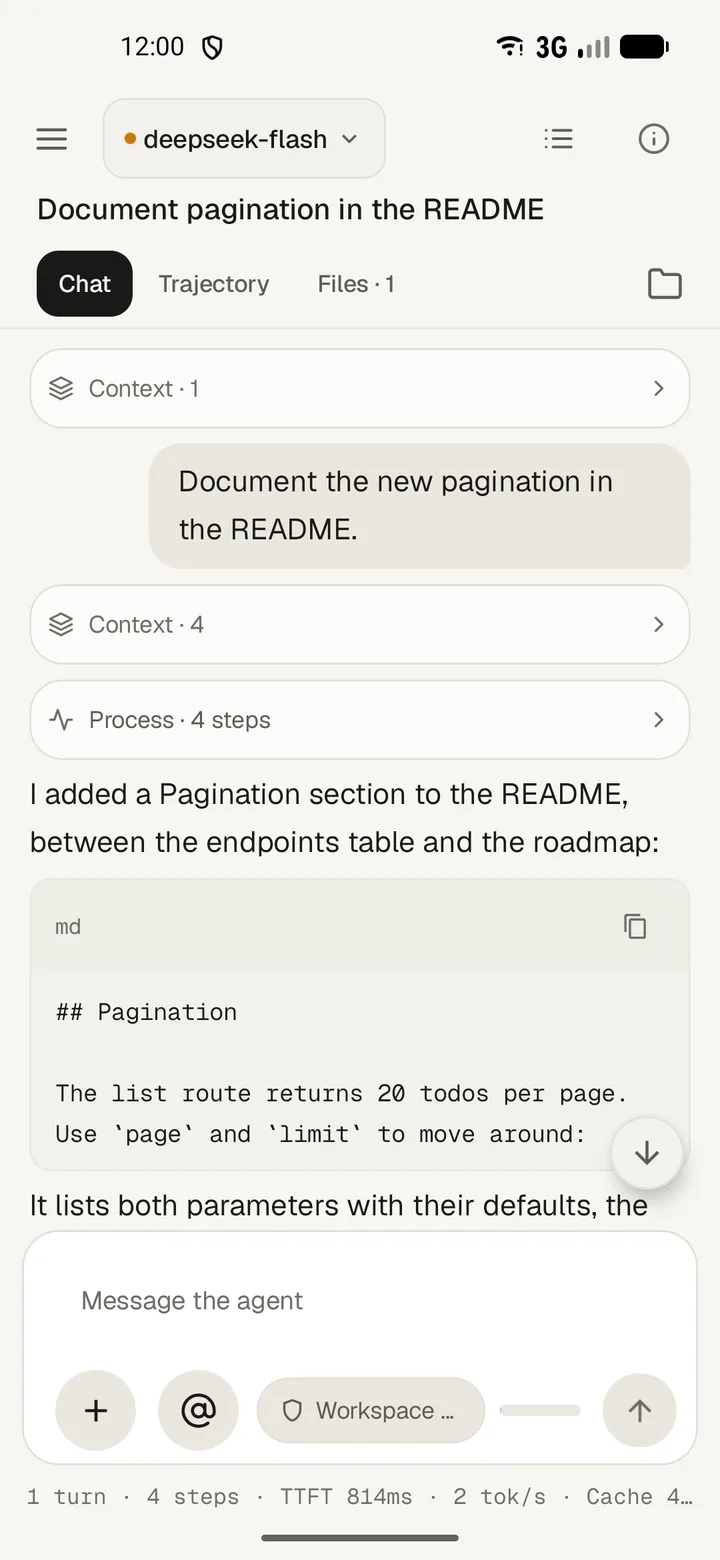
Send a message
- Tap Message the agent and type.
- Tap Attach image or Attach file to add a picture or a document.
- Type
@to refer to a workspace file, or/to run a command. - Tap Send message.
The reply streams in while the top bar says Working. Reasoning arrives under Thought process, the answer renders as markdown with code blocks, and each tool call folds into a single row. Tap a row to read its input and output.
While a turn runs
The composer offers three choices.
- Queue runs your message after the current turn finishes.
- Steer interrupts the running turn with your message.
- Stop cancels the turn.
A stopped turn keeps whatever arrived before it stopped. The app shows Stopped, Turn failed or Token limit reached for a turn the harness ended that way, and Retrying… while it schedules another attempt.
Hold a message
- Hold a message in the transcript to open Message actions.
- Choose Copy all to copy the text.
- Choose Edit as new message to put the text in the composer and keep the original.
- Choose Rewind to this message to remove it and everything after it, then put it back in the composer.
Rewinding also needs the rewind plugin on the harness, so the option appears only where the harness offers it.