Sessions and workspaces
Open the sessions drawer, group chats by project, and put them in the order you want.
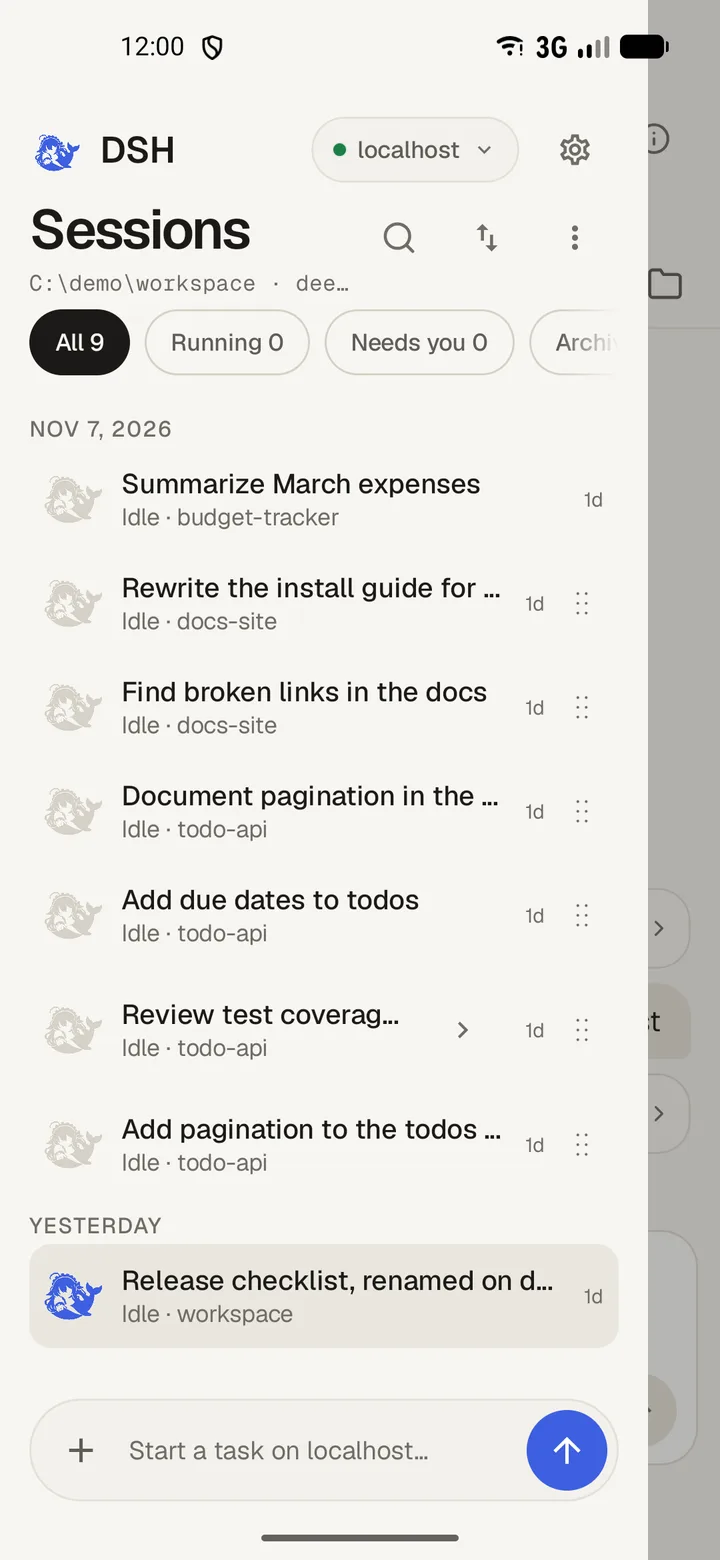
Open the drawer
- Swipe in from the left edge of the screen.
- Tap a session to open it.
- Swipe the drawer back towards the edge to close it.
Needs you marks a session with an approval, a question or a plan waiting for you. Search sessions matches titles and project names.
Group by project
- Tap Order and choose Group by project.
- Tap a project heading to fold its sessions away.
- Tap the heading again to unfold them.
Sessions that belong to no project sit under Other.
Reorder sessions
- Tap Order and choose Manual order.
- Hold a row and drag it where you want it.
- Drag a project heading to move the whole group.
A session moves only inside its own project. If a move fails, the row returns where it was and the drawer says so.
Reload the list

- Pull down at the top of the list, past the latch, and let go.
- The drawer re-reads the list from the harness. A check appears when it lands.
- The same read sits in the overflow menu as Refresh sessions.
If the read fails, the drawer shows the failure itself, with Couldn't refresh the session list.
Start and edit sessions
- New session starts a session in the current project.
- New session in… lets you choose a folder first.
- Hold a session for Rename session, Fork session, Archive session and Pin session.
- Archived lists sessions you archived, with Restore on each one.